Serving Compressed Files From ZIPs

Written by David Evans, first published (last updated )
One of the cooler (in my very uncool opinion) features of
web-listener is the ability to
serve gzip-encoded data directly from
regular .zip archives,
without needing to use lots of memory or create temporary files. This article
will explain what this means and why this is possible.
HTTP Content-Encoding
When serving files over HTTP, clients can send an
Accept-Encoding
header, listing the types of compression which they support. Most modern
browsers support these encodings:
gzipdeflatebr(Brotli)zstd
Other tools like
curl and
wget typically
support gzip and deflate.
The server can choose to compress the content using one of the requested
encodings, and send a response with the
Content-Encoding
header showing the chosen compression type. This can be done using “online”
compression, but for static content it is more efficient to store pre-compressed
files. As an example: in NGINX this can be achieved using
ngx_http_gzip_static_module,
which will look for sibling .gz (gzip) files when serving content from the
filesystem:
 var/www/http
 index.html
 index.html.gz
 style.css
- style.css.gz
server {
  listen 8080;
  listen [::]:8080;
  root /var/www/http;

  gzip_static on;
  gzip_vary on;
}
curl -v http://localhost:8080/index.html # -> index.html
curl --compressed -v http://localhost:8080/index.html # -> index.html.gz
Serving from ZIPs with web-listener
The web-listener library can do the same as NGINX, but also supports serving these files directly from a ZIP archive, removing the need to duplicate the files as a compressed and non-compressed copy:
- var/www/http/content.zip
- index.html
- style.css
npx web-listener /var/www/http/content.zip
curl -v http://localhost:8080/index.html # -> decompressed index.html
curl --compressed -v http://localhost:8080/index.html # -> index.html as stored in ZIP
Behind-the-scenes
How does this work?
Deflate
Two of the common compression options (gzip and deflate) are based on the
deflate compression algorithm, which
combines Lempel-Ziv (to
deduplicate repeated content) and
Huffman coding (to use fewer
bits when storing more common symbols). It’s easy to implement, patent-free,
robust, and generally gives good compression ratios. These qualities have made
it the basis of a large number of the older compression formats. It’s used by
ZIP, gzip, Zlib, PNG, and more.
In recent times it has been somewhat superseded by Zstd (which has a comparable compression ratio but is faster to decode) and Brotli (which achieves better compression by using a large pre-shared dictionary of common fragments), but deflate-based formats are still popular due to being very widely supported and being good enough for the majority of use cases.
ZIP
The ZIP archive format compresses each input file individually using
deflate(note 1), then bundles them along with their metadata
(filename, size, permissions, etc.) into a single archive:
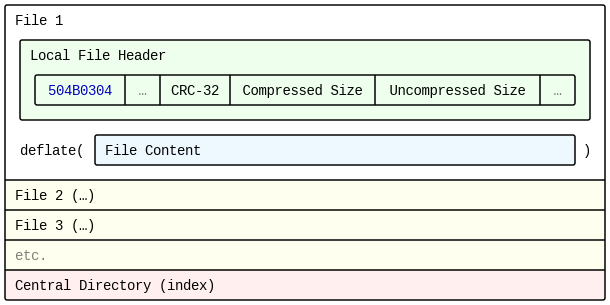
.zip structure.This is very different to the behaviour of
tar-based formats such as
.tar.gz, which bundle the files and metadata together first (the tar
stage) then compress everything at once (the gzip stage):
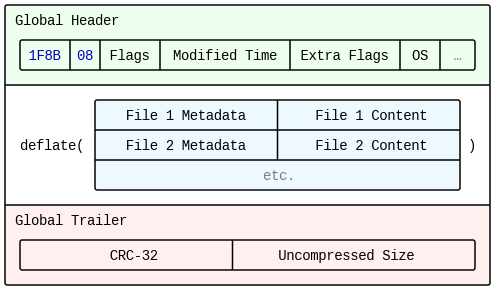
.tar.gz structure.This means that ZIP archives can easily be extended with new files (or have existing files deleted) without needing to recompress all the other files. It also means individual files can be located and extracted without needing to decompress everything else. The downside is that it cannot take advantage of duplication across files to achieve better compression: if two files in a ZIP archive have identical contents, they will not be deduplicated, and will occupy twice the space of a single copy.
The problem with Content-Encoding: deflate
The first thing to notice is that ZIP archives store their files using
deflate, and deflate is one of the Content-Encoding options which is
widely available. Why not just serve the ZIP contents as deflate-encoded data?
The problem begins, as with many things on the Internet, with Internet Explorer. Or — arguably — with every browser except Internet Explorer.
When deflate encoding was introduced, Internet Explorer’s engineers took it at
its name and interpreted the content as a raw deflated stream of data.
Exactly the same thing which gets stored in a ZIP archive. But the proposal (and
other browsers at the time) interpreted it as a zlib-wrapped deflated
stream of data (which later became
RFC-1950). The difference is
that zlib adds a 2-byte header and a 4-byte Adler-32 checksum:
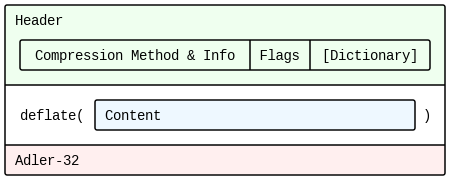
A mess ensued. The standards decided that the zlib-wrapped version was
“correct”, but many existing websites conformed to Internet Explorer’s raw
interpretation so that they would work in that browser. To try to clean things
up, later browsers added checks to detect whether the header and footer are
present, aiming to support both forms, but these checks did not get
standardised. The situation is fragile at best, and realistically deflate
should be considered a legacy encoding.
The alternative gzip encoding also uses raw deflated data, but wraps it
with a slightly larger 10-byte header and 8-byte trailer. This means it is
always exactly 12 bytes larger(note 2) than an equivalent
standards-compliant deflate encoding, but benefits from being interpreted
consistently by all implementations.
Since the actual compression is the same in both formats, to get from a ZIP to
gzip encoding all we need to do is populate that header and trailer…
Translating ZIP to gzip
The gzip header is largely static, and the dynamic fields can be set to static values without issue since they are not used by HTTP clients:
| Magic number | Compression Method | Flags | Modified Time | Extra Flags | Filesystem |
|---|---|---|---|---|---|
1F 8B |
08 |
00 |
00 00 00 00 |
00 |
FF |
The trailer is a bit more complicated:
| CRC-32 of uncompressed data | Uncompressed size modulo |
|---|---|
xx xx xx xx |
xx xx xx xx |
Fortunately, ZIP archives store both of those values alongside the files. Even more fortunately, both ZIP and gzip agree on the specific CRC-32 implementation. So we can easily populate this trailer data with the correct values without needing to decompress anything.
Putting it together, to send a file from a ZIP archive as a gzip-encoded response all we need to do is:
- Send the HTTP headers as normal, with
Content-Encoding: gzip(andVary: Accept-Encoding);- we can also set the
Content-Lengthheader, since we know the compressed size (+ 18 for header and trailer data) in advance
- we can also set the
- Send the raw bytes
1F 8B 08 00 00 00 00 00 00 FF(we can optionally fill in the modification time if we feel like it); - Send the part of our ZIP archive which contains the
deflated file; - Send our ZIP archive’s CRC-32 for the file;
- Send our ZIP archive’s uncompressed size for the file (truncated to the lower 32 bits if it is a ZIP64 file).
Supporting clients which do not support gzip
For the few clients which do not support gzip, the server must be able to serve uncompressed content. This means it must decompress the data stored in the ZIP. This is a fast operation (much faster than compression), and need not consume significant memory since the result can be streamed directly to the client as it is generated.
Creating a ZIP archive
With the implementation handled, all that remains is to generate a suitable ZIP
archive. Ideally we want the highest possible compression, since this will be
generated once and used many times. Using the standard
zip CLI utility, we
can create our archive with:
cd my-content-folder
zip -8Xr -n .png:.jpeg - * > ../content.zip
The flags are:
-8: use level 8 compression (the highest is 9, but 9 ignores the-nflag set later);-X: do not include extended file attributes;-r: recursive (include subfolders);-n .png:.jpeg: do not attempt to compress PNG or JPEG files (this list can be extended with any file extensions which should not be compressed);-: write the archive tostdout(this avoids any attempts to modify an existing archive);*: compress all files in the current directory;> ../content.zip: pipestdoutto the file “content.zip” in the parent directory.
By default, zip will store files without compression if compressing them does
not make them smaller, but we can also specify -n to save time by not even
attempting to compress certain file formats which use their own compression.
Even more power
For added power, web-listener lets
us bundle server-side configuration and sources into a ZIP archive, letting us
distribute and run an entire web application as a .zip (akin to
Java’s .war files). A
custom Node.js
loader hook is used to
run sources directly from the ZIP archive, without extracting temporary files.
For example:
- my-site.zip
 config.json
- server
 math.mjs
- static
- index.html
- style.css
config.json
{
  "$schema": "https://davidje13.com/schema/web-listener.1.5.4.json",
  "servers": [
    {
      "port": 8080,
      "mount": [
        {
          "type": "headers",
          "headers": {
            "cache-control": "public, max-age=600",
            "x-content-type-options": "nosniff",
            "referrer-policy": "no-referrer"
          }
        },
        {
          "type": "custom",
          "method": "POST",
          "path": "/add",
          "import": "./server/math.mjs",
          "namedExport": "add"
        },
        {
          "type": "files",
          "path": "/",
          "dir": "./static",
          "options": {
            "negotiation": [
              {
                "feature": "encoding",
                "options": [{ "value": "gzip", "file": "{file}.gz" }]
              }
            ]
          }
        }
      ]
    }
  ]
}
(.gz files are implicitly available because the content is in a ZIP archive.
The negotiation in this configuration allows these implicit files to be used).
server/math.mjs
Here is a silly example API which adds two POSTed numbers together:
import { getFormData, requestHandler } from 'web-listener';

export const add = requestHandler(async (req, res) => {
  const data = await getFormData(req, { maxContentBytes: 128, maxFiles: 0 });
  const a = Number.parseFloat(data.getString('a'));
  const b = Number.parseFloat(data.getString('b'));
  res.setHeader('cache-control', 'no-store, no-cache, max-age=0');
  res.setHeader('content-type', 'text/plain; charset=utf-8');
  res.end(String(a + b), 'utf-8');
});
Running
npx web-listener -c my-site.zip/config.json
Footnotes
ZIP itself allows different choices of compression, but the standardised subset of ZIP (ISO/IEC 21320-1:2015) only permits two modes: uncompressed, and compressed using
deflate. ↩︎Since “gzip” is 3 characters shorter than “deflate” in the
Content-Encodingheader, the data sent is technically only 9 bytes larger in total. ↩︎