HTTPS with NGINX

Written by David Evans, first published (last updated )
NGINX makes setting up HTTPS very easy (especially when
combined with certbot), but some optional features can be a bit trickier to
set up. Here we’ll focus on hosting multiple sites with different certificates,
blocking requests for unknown or unspecified hosts, and setting up TLS Session
Resumption.
The basics
First, the basics. To set up nginx with HTTPS there are a few simple initial steps:
Generate private parameters for Diffie-Hellman key exchanges. Using Diffie-Hellman for the initial key exchange means that the per-connection encryption keys will remain secret, even if an attacker records the network traffic and later compromises the certificate’s private key (this is called Perfect Forward Secrecy):
openssl dhparam -out dhparam.pem 2048;
sudo mv dhparam.pem /etc/nginx/dhparam.pem;
sudo chmod 0600 /etc/nginx/dhparam.pem;
sudo chown root:root /etc/nginx/dhparam.pem;
Configure nginx with a set of secure ciphers and the generated parameters (put this config in the
httpblock, not inside individualserverblocks; we’ll see why below). This is typically done by adding a new file to/etc/nginx/conf.d/:ssl_protocols TLSv1.2 TLSv1.3; ssl_prefer_server_ciphers on; ssl_ciphers HIGH:!aNULL:!MD5:!PSK:!CAMELLIA:!SHA1:!SHA256:!SHA384:!AES128:!ARIA128:!AES256-GCM-SHA384:!AES256-CCM8:!AES256-CCM:!ARIA256-GCM-SHA384; ssl_dhparam /etc/nginx/dhparam.pem;Here we start with the
HIGHsuite of ciphers and turn off the known insecure ones. Another option is to use a tool like TLS Configurator to get a specific set of allowed ciphers based on the versions of tools being used.Configure a listener for HTTP traffic to serve
acme-challengefiles (required if usingcertbotand itswebrootverification to get a certificate), and redirect other requests to HTTPS:server { listen 80; listen [::]:80; root /var/www/http; location / { return 301 https://$host$request_uri; } location /.well-known/acme-challenge/ { # this block can be empty; it's more specific than # '/' above, so takes priority (avoiding the redirect) } }nginx -s reloadObtain a certificate from
certbot(here using the simplewebrootverifier):certbot certonly \ --non-interactive \ --agree-tos \ --register-unsafely-without-email \ --keep-until-expiring \ --cert-name my-cert \ --webroot \ -w /var/www/http \ -d example.com;Configure a listener for the site to be served via HTTPS:
server {
  listen 443 ssl;
  listen [::]:443 ssl;

  ssl_certificate /etc/letsencrypt/live/my-cert/fullchain.pem;
  ssl_certificate_key /etc/letsencrypt/live/my-cert/privkey.pem;

  # (rest of site config here)
}
nginx -s reload
Now the site is being served over HTTPS. By adding more server blocks and
setting explicit server_names, it’s possible to include multiple sites, and
they can either share a certificate which has multiple domains (add more -d
flags to the certbot call), or each use their own certificate (call certbot
multiple times with different --cert-name values to get a certificate for each
site).
I like to use SSLLabs to test the resulting setup, since it can flag insecure cipher choices as well as many other configuration issues.
TLS Session Resumption
Our current setup requires clients to negotiate a new encrypted channel every time they connect. The process looks like this:
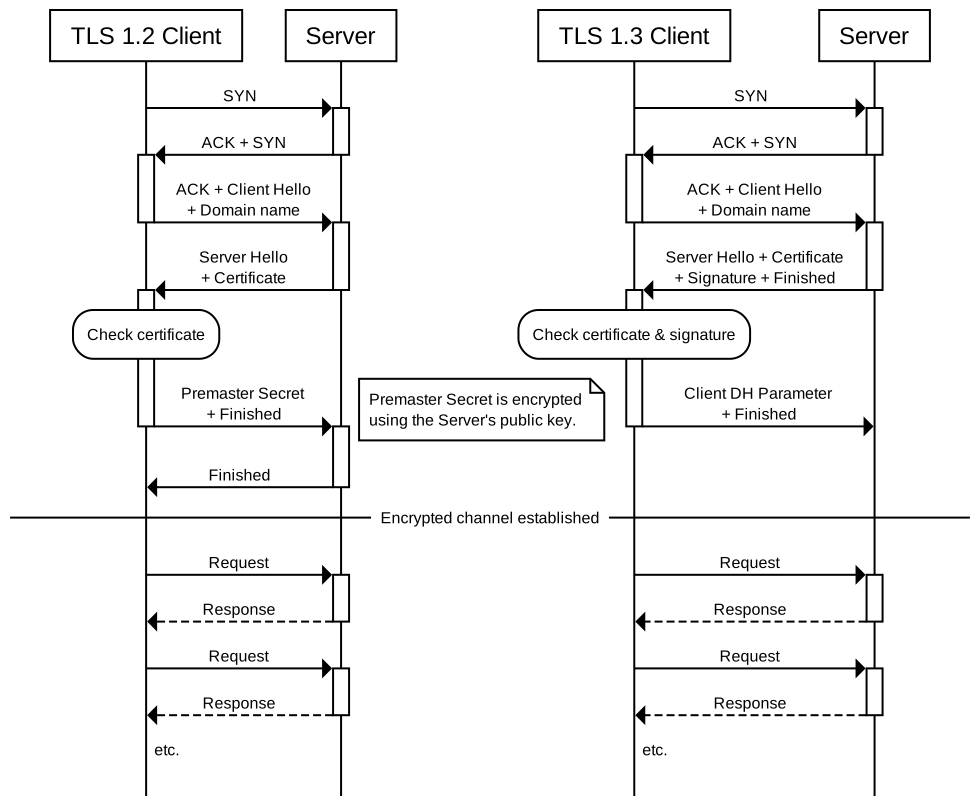
TLS Session Resumption saves some round-trips and processing time when clients
reconnect to download new content. Without Session Resumption, the client would
need to perform the full TLS handshake again (2 round-trips before requesting
any data), but with Session Resumption, the client can request the new data
after just a single round trip (or even 0 round trips if using
ssl_early_data, but beware of the potential for “replay attacks” with that).
There are 2 implementations of TLS Session Resumption:
Session IDs: the server stores the connection parameters and gives the client a Session ID. The client can send this ID back later to re-establish a TLS session with the same parameters (as long as the server still remembers them). This has limitations if the server runs out of available memory, or is part of a load-balanced cluster.
Session Tickets: the server encrypts and signs the connection parameters and sends them as an opaque blob to the client. The client can send this opaque blob back to the server later when reconnecting, where it will be validated and decrypted, then used to re-establish a TLS session with the same parameters. This requires only sharing a single (or small group) of master keys between servers in a cluster, making the server-side memory and data transfer requirements much less onerous.
TLS 1.3 only supports the latter approach, under the new name of Pre-Shared Keys rather than Session Tickets. TLS 1.2 supports both.
It is important to note that Session Tickets introduce a potential vulnerability: if an attacker gets access to the root key stored in the server, they can decrypt all Session Tickets, giving them the details they need to decrypt all connections, past and future (until the key is cycled). This breaks Forward Secrecy(note 1). For this reason, the common recommendation is to cycle the root key frequently (at least once per day, and some sites rotate it much more often) to limit the impact of a compromise.
Many sources recommend disabling Session Tickets in nginx because it did not originally support automatic cycling of the root keys, but this behaviour now exists in widely available versions and the advice to disable Session Tickets is increasingly out-of-date.
To enable Session Tickets on a single server (using a randomly generated root
key which will automatically be rotated), add the following to the http block
configuration (e.g. a file in /etc/nginx/conf.d/):
ssl_session_cache shared:SSL:5M;
ssl_session_timeout 1h;
ssl_session_tickets on;
A breakdown of these options:
ssl_session_cache shared:SSL:5M: set up a shared memory pool (shared between all nginx workers on the current server) named “SSL” (an arbitrary name), with a size of 5MB. The larger this cache is, the more Session IDs can be stored. The root keys for Session Tokens are also stored in this cache, but they do not need much space.ssl_session_timeout 1h: the maximum amount of time that a Session ID or Token sent to a client will be valid for. This also controls the rate at which default randomly-generated root keys are cycled. Here it is set to 1 hour.ssl_session_tickets on: allow using Session Tickets (as well as Session IDs as a fall-back for clients which do not support tickets).
The default behaviour is to generate a random root key, and regenerate it at
intervals of ssl_session_timeout. NGINX then stores 2 of these keys at a time:
one to use for new connections, and the other (the previous key) to validate
existing tickets which have not yet expired.
Load balancing
If you are load-balancing multiple nginx servers, they must share the root keys between them so that tickets issued by one will be recognised by the others. If you do not do this, the site will still be served without any apparent issues, but Session Resumption will simply not work whenever clients reach a different server when resuming their connection (falling back to a full handshake).
To share keys, they must be generated externally and passed in to nginx via
ssl_session_ticket_key. Then you can use whatever means you prefer for
sharing the key files between servers.
The keys can be generated and cycled with:
rm previous.key
mv current.key previous.key
mv upcoming.key current.key
openssl rand 80 > upcoming.key
(this may be scheduled using e.g. crontab).
And loaded with:
ssl_session_ticket_key current.key;
ssl_session_ticket_key previous.key;
ssl_session_ticket_key upcoming.key;
This particular approach keeps 3 keys in use at a time: the current key is
used for new connections (because it is listed first in the nginx config). The
previous key can still be used to validate existing tokens (issued before this
key was cycled, but which have not yet expired), and the upcoming key adds
some leeway to allow time for the keys to propagate between all servers (all
servers in the cluster will be able to accept connections using the next key,
even if they have not yet cycled to it themselves).
Testing Session Resumption
SSLLabs can be used to confirm that Session Resumption is working, but it will not check that the keys are being rotated.
To confirm that key rotation is working with your setup, you can make a series of TLS 1.2 requests to the server and inspect the responses:
openssl s_client -connect example.com:443 -tls1_2 -servername example.com </dev/null 2>/dev/null | grep -A14 'TLS session ticket:'
(change both occurrences of example.com to your domain)
This will print out the opaque session ticket blob. Fortunately, nginx follows a
convention of using the first 16 bytes of this opaque blob to store the key ID.
If you make multiple requests in succession, you should see that although most
of the data changes at random, the first 16 bytes (the first line of output) is
constant. When the key rotates, this line will change, so you should see it
change at intervals of ssl_session_timeout.
Troubleshooting
The key changes with every request
This probably means you are not sharing the keys between servers / workers
correctly, or the ssl_session_timeout is set too low:
- Ensure you have set the
ssl_session_cachetoshared; - Check the units of your
ssl_session_timeoutvalue, and note that values without a unit are assumed to be in seconds; - If you are load-balancing between multiple servers, check your code for distributing keys between the servers.
The key never changes
This probably means the keys are not cycling at all, not being reloaded by
nginx, or the ssl_session_timeout is set too high:
- Check the units of your
ssl_session_timeoutvalue; - If you are generating your own keys, check that the files on disk are actually changing when you expect them to (if they are not updating, check that the background process has the necessary permissions to change them);
- Updated keys should be picked up by nginx immediately (without the need to
reload the config), but if you have exhausted all other options, you may want
to try running
nginx -s reloadafter cycling the keys to check if it makes any difference.
SSLLabs reports “IDs assigned but not accepted”
If your SSLLabs report includes “Session resumption (caching): No (IDs assigned but not accepted)”, this could mean the default server does not have the necessary SSL configuration for session resumption, the keys are cycling too quickly to be useful, or the keys are not being shared between servers / workers correctly:
- Confirm your SSL Session configuration options are in the
httpblock of nginx’s config, not aserverblock; - Ensure you have set the
ssl_session_cachetoshared; - Check your
ssl_session_timeoutvalue (ensure it is at least a few minutes, and ideally at least an hour); - If you are load-balancing between multiple servers, check that the key files on each server have the same content.
Blocking unknown and unspecified hosts
When working with multiple sites served by a single nginx instance, it’s often desirable to block access to the raw IP address (by default, nginx will serve whichever site was defined first).
For this it’s useful to understand how requests get routed to the correct site
(confusingly called a server in the nginx config).
Classically (in HTTP), the Host header is used to decide which site should
respond to a request. However with HTTPS the Host header (along with all other
headers and the requested URL) is not sent until the TLS connection is
established. But the server does not know which certificate to send to establish
the TLS connection until it knows which site the client wishes to connect to. A
“Chicken or egg” problem.
To solve this, clients send the hostname (but not the full URL path) as part of the initial “client hello” packet(note 2). This is read by nginx to decide which site (and therefore which certificate) to use.
When resuming a session, the approach is slightly different: the request does
not (necessarily) include a hostname in the first packet. This means that nginx
has to fall-back to using whichever site is its default(note 3) for the
purpose of resuming the TLS session, then can switch to the correct site once
the secure channel is established and the Host header has been sent. This is
not a problem, because the encrypted session token is tied to the server’s
private key, not the specific site’s certificate.
All of this means that we can set up a default “catch-all” site to block access, but we must be aware that it will also be responsible for handling TLS Session Resumption requests:
server {
  listen 80 default_server;
  listen [::]:80 default_server;
  listen 443 ssl default_server;
  listen [::]:443 ssl default_server;

  ssl_reject_handshake on;

  access_log off;
  lingering_close off;
  return 444; # nginx special code: close without response
}
Note: for TLS Session Resumption to continue working with this configuration, it
is important that both the ssl_protocols [...] configuration and the
ssl_session_cache [...] configuration are defined at the root level (inside
the http block, not a server block), as described above. If they are defined
only at the server level, TLS Session Resumption will fail. The
ssl_certificate and ssl_certificate_key config lines can (and should)
continue to be defined at the server level, allowing you to specify different
certificates for each site.
With this configuration, requests for unknown domains and requests which do not
specify a domain at all will be rejected immediately, with no SSL handshake
(ssl_reject_handshake on) and no response (return 444). Rejecting
connections like this avoids the need for a “stub” self-signed certificate, used
by some other approaches. Requests to resume an existing session will succeed,
then get re-assigned to the correct site.
Bonus HTTPS configuration
There are some simpler HTTPS features which can also be enabled:
Strict-Transport-Securitycan tell browsers to only ever connect to your site using HTTPS, even if a user types a URL (or follows a link) withhttp://. Setting this header also allows submission to the HSTS Preload List to protect users on their first visit to your site.Warning: This header can be dangerous if enabled too eagerly, since it’s effectively impossible to undo; you need to be very sure that every part of your site — including sub-domains — works over HTTPS before adding this header.
If you are ready to add it, the nginx syntax is:
add_header Strict-Transport-Security "max-age=30; includeSubDomains" always;Then after confirming it has not broken anything, you can gradually increase the
max-ageuntil it reaches 1 year (31536000), and addpreloadto allow adding the site to the HSTS Preload List:add_header Strict-Transport-Security "max-age=31536000; includeSubDomains; preload" always;(after adding this header with
preload, you can manually submit the site to the HSTS Preload List).ssl_early_dataallows 0-round-trip requests from returning clients using TLS 1.3, improving latency. This comes at a cost of introducing a potential vulnerability: replay attacks. See the nginx documentation for full details on how you can mitigate this in your application. If you know for sure that your application is not vulnerable to replay attacks (e.g. if your application serves read-only content), you can safely enable this option.
More information / further reading
I found the following sources useful while figuring this stuff out:
- Cloudflare explainer on TLS Session Resumption
- Certbot explanation of HTTP-01 Challenge
- NGINX SSL module documentaion
- OneUptime guide on setting up and monitoring Session Resumption
- Compass Security explanation of interaction between TLS Session Resumption and Perfect Forward Secrecy (note: the advice at the end of this article is out-of-date)
- certbot documentation
openssl dhparammanpageopenssl randmanpage
Footnotes
Forward Secrecy is the idea that if an attacker passively records encrypted network traffic, they should not be able to decrypt it after stealing secrets in the future. ↩︎
Since this is sent before the encrypted channel is established, it is in plain text and can be observed by all nodes along the route; an obvious privacy concern. It is also sent by clients regardless of the server’s configuration, so even servers which only serve a single site will receive the host in the unencrypted “client hello” packet, with no ability to stop it being sent (but, equally, traffic to servers which serve only a single site is identifiable by the IP address anyway). Recently, “encrypted client hello” has emerged as a way to avoid the plain-text privacy issue, but it requires a very recent version of OpenSSL and is beyond the scope of this article to configure. ↩︎
Decided by the presence of
default_server, or first site defined if none have this. ↩︎