CORS, CORP, COEP, COOP, and COnfusion

Written by David Evans, first published
In the beginning there was nothing. Then Sir Tim Berners-Lee said: “Let there be The World Wide Web”. And Lo, there was The World Wide Web. And he saw that it was Good Enough.
In the early days of the web, there was nothing particularly sensitive or dangerous available on it. No credit card numbers, no virtually signed contracts, no secret documents. It was a place of experimentation, and the more things could communicate with each other, the better.
That didn’t last long, and the job of security has been playing catch-up ever since. Rather than making large design changes to the fundamental protocols (which would break existing sites), security patches have been added piecemeal; fixing specific known vulnerabilities in a very conservative way. Web developers continue to need to understand these security patches and their implications on each new site. This article will focus on some security headers which have built up over the years to facilitate safe Cross-Origin Resource Sharing (CORS).
If you don’t care about the history or the whys, and just want to know which combinations have what effects, skip to the summary of cross-origin headers.
Terminology
First some quick terminology which will be relevant in the following sections:
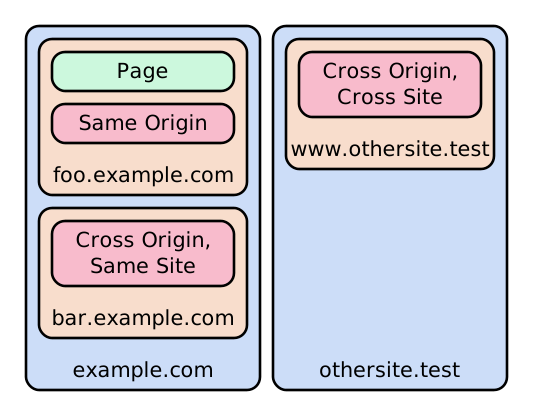
An origin is a full scheme, domain name, and port (the port may be
implicit), such as https://foo.example.com:443.
A site is a more relaxed version of this: it does not include subdomains or
the port, so for example https://foo.example.com:1234 and
https://bar.example.com:5678 are both on the same site
(https://example.com). Note that although the port can change, the scheme
cannot, so http://example.com:80 and https://example.com:443 are not the
same site.
This article will use page to refer to a top-level document (typically a
HTML file, such as https://example.com/index.html) which may embed
resources (such as images, scripts, videos, etc.) from its own origin or
other origins.
Showing resources from other origins
Many web pages embed resources (such as images, iframes, or even scripts) from another origin. Sometimes this is for performance reasons (e.g. using a third-party CDN to serve large images or fonts), sometimes for integration (e.g. Facebook “like” buttons or badges on projects), but most often it is for embedding adverts and trackers. All of these are known as “cross-origin” resources.
Originally this was considered harmless and was allowed with wild abandon, until an attack opportunity was noticed: if a malicious page loaded content from a different origin which the current visitor was logged in to, then it could see content from that origin which was only intended for the visitor. In this way, cookie-based authentication, IP allowlists, and local network resources could be breached just by visiting a malicious page.
For security, these cross-origin requests would need to be blocked. But blocking
all cross-origin requests would break a large number of sites (and worse: break
advertisements), so after some trial and error, the
Origin
request header and Access-Control-Allow-*
response headers appeared(note 1).
The idea was simple: servers can check the unspoofable Origin request
header(note 2), and if they intentionally want to share the requested resource
with that origin, they can include an Access-Control-Allow-Origin response
header to make that approval explicit. By doing so, the server takes
responsibility for making sure that either the requesting origin is trusted, or
that the content won’t ever include anything sensitive (e.g. anything unique to
the user, or with restricted access). If the header isn’t included in a response
(or doesn’t list the origin which requested it), then the resource is blocked by
the browser.
So Access-Control-Allow-Origin allows explicit Cross-Origin Resource Sharing
(CORS): the provider of a resource can explicitly allow the resource to be used
in other origins. Everything else is blocked.
This solution was considered Good Enough.
Showing resources from uncooperative origins
For perfectly benign reasons, plenty of pages still wanted to be able to show
content from other origins which did not add the Access-Control-Allow-Origin
header.
After some trial-and-error, the crossorigin attribute was introduced for
various HTML elements and the concept of a “CORS” vs. “non-CORS” request
appeared. The idea was simple: If a page wants a cross-origin resource, but the
resource does not have the required ACAO header, then it can still be loaded
and displayed, but will be “tainted”. The page will not be able to access any
information about it (such as response status, headers, or even pixel data of
images). Errors from tainted scripts cannot be captured by error listeners.
Tainted images and videos can still be copied to a canvas, but by doing so the
canvas also becomes tainted, meaning JavaScript can no longer read pixel data
from it. In short: the resource can be displayed to the user, but cannot be
accessed programmatically.
Resources loaded with a crossorigin attribute are CORS, and continue to check
the Access-Control-Allow-* headers. Resources loaded without this attribute
are non-CORS, and load regardless of the Access-Control-Allow-* headers, but
are marked as tainted. For example:
- a third-party tracker would be loaded with
crossorigin="use-credentials"so that the third party cookies are sent with the request, then the response would setAccess-Control-Allow-Originto allow the tracker data to be used on the page; - an image from an up-to-date CDN would be loaded with
crossorigin="anonymous"so that no user data is included in the request, and the response would setAccess-Control-Allow-Originto allow the image to be used; - an image from a legacy CDN would be loaded without any
crossoriginattribute, and the response does not need to set any header. The image can be displayed but not inspected via JavaScript.
With non-CORS requests, most setups which had been broken by the previous fix started working again, and now it didn’t come at the cost of leaking data everywhere.
This solution was considered Good Enough.
A spectre appears
For a long time it was assumed that if there is no way to access a piece of data, then that data is safe. But then along came “speculative execution attacks” (aka Spectre). These exploit performance optimisations which are built-in to the CPU itself.
Put simply: modern CPUs try to run faster by predicting what will happen next, using any data available to them. If they get this prediction right, the data and instructions that will be needed next are already loaded into cache and run faster. If they get the prediction wrong, execution has to pause while the correct data is loaded in. This means that correctly-predicted operations run faster than incorrectly-predicted operations (sometimes by a large margin). Because CPU manufacturers didn’t think they needed to add security checks to the data available for speculation, an attacker who is able to measure timings very precisely can exploit it to infer the contents of memory which they should not have access to.
This new attack method caused quite a stir. It couldn’t be entirely fixed at the CPU level for existing hardware, so operating systems had to step in and start explicitly flushing speculation data from the CPU at sensitive moments. Roughly speaking, the operating system allows process 1 to perform some work, then flushes the data from the CPU, then allows process 2 to perform some work. This isolates the data of process 1 from process 2, even with Spectre-style attacks.
With this fix, as long as sensitive data does not live in the same process as untrusted code, it can be considered safe(note 3). Browsers had already been moving towards using separate processes for each origin for isolation and performance reasons, so this model matched up nicely, but with one exception: tainted cross-origin data.
To avoid attacks, any page containing tainted cross-origin data would need to defend against Spectre in some other way. The obvious thing to do was look at the other requirement for successful Spectre attacks: high resolution timings.
Some of the newer features of JavaScript at the time were focused on high
performance, which made them ideal ways to measure very precise amounts of time.
One example is SharedArrayBuffer, which allows WebWorker threads to share
memory. An attacker can use one worker to do nothing except update a shared
memory value at high speed, and another worker to perform an operation which
will (thanks to speculative execution) run quickly if a piece of protected
memory has a particular value, and more slowly otherwise. The shared data
(acting as a very high-resolution clock) can be used to check whether it ran
fast or slow.
For security, this capability (as well as several other high-performance features) would have to be blocked. The new APIs were removed.
This solution was considered Good Enough.
Re-enabling high-performance features
Web developers still wanted to be able to use high-performance features, and those who didn’t even try to load cross-origin resources felt rather hard-done-by with their removal.
After some trial-and-error, a new feature was added to bring them back. The idea was simple: if a page wants high performance features, it has to opt out of being able to load external resources which don’t set access headers. By opting out of this feature, the page is considered “cross-origin isolated” and can use the high performance APIs.
Three new headers were introduced:
Cross-Origin-Opener-Policy(COOP);Cross-Origin-Embedder-Policy(COEP); andCross-Origin-Resource-Policy(CORP).
By default (if the headers are not used), the assumption is that the legacy ability to load cross-origin non-CORS resources without explicit headers should work, and the fast APIs are blocked; no change from the previous setup.
But to be “cross-origin isolated” (and therefore have access to high-performance features), both COOP and COEP must be set on the page:
Cross-Origin-Opener-Policymust besame-origin. This header controls which origins are able to communicate with the page (e.g. if they open the page via<a target="_blank" rel="opener">). Setting it tosame-originblocks this communication, implicitly telling the browser to prefer keeping the page in a separate process which does not contain other origins.Cross-Origin-Embedder-Policymust be eitherrequire-corp(widely supported) orcredentialless(not yet supported in Safari). Setting this header opts the page in to more stringent security requirements, controlling which resources the page is allowed to load via non-CORS requests:- If it is set to
require-corp, non-CORS requests will only be allowed if the response includes an explicitCross-Origin-Resource-Policy(i.e. it changes the default fromcross-origintosame-origin). - If it is set to
credentialless, the rules are relaxed a bit: resources without aCross-Origin-Resource-Policycan be loaded, but now all non-CORS requests will be made without any credentials (such as cookies) included.
- If it is set to
Cross-Origin-Resource-Policy and Access-Control-Allow-Origin are similar,
but apply to different types of request. CORS requests (which specify a
crossorigin attribute) continue to use ACAO, and do not check CORP. Non-CORS
requests (without a crossorigin attribute) continue to ignore ACAO, and now
check CORP.
If CORP is set to cross-origin, it means the resource is considered
non-sensitive: any page can load it via a non-CORS request and have dangerous
JS features enabled. If it is set to same-site or same-origin, the resource
will be considered sensitive and cannot be loaded using non-CORS requests on any
page which does not meet the criteria (even if the page has not itself set a
COEP header).
With these headers set up, we get strong guarantees about whether our data is allowed to share a process with third party origins, meaning (as long as it’s been set up securely): pages can once again use high-performance APIs, without being able to use them to access sensitive data from other origins.
This solution is considered Good Enough.
Appendix: Summary of Cross-Origin headers
Suppose we have a page at https://example.com attempting to load a resource
from https://resources.test. There are a variety of ways this could be set up,
which will control whether the resource loads at all, whether it is tainted, and
whether the request includes the user’s credentials:
With crossorigin (CORS)
When a resource is loaded using a crossorigin attribute, it does not matter
whether the page has a COEP header, nor whether the resource has a CORP header;
the behaviour depends only on the resource’s Access-Control-Allow-* headers:
| Resource headers | crossorigin="use-credentials" |
crossorigin="anonymous" |
|---|---|---|
| not set (legacy) | ❌️ blocked | ❌️ blocked |
|
❌️ blocked | ✅️ allowed, no cookies sent |
|
❌️ blocked | ✅️ allowed, no cookies sent |
|
❌️ blocked | ✅️ allowed, no cookies sent |
|
✅️ allowed | ✅️ allowed, no cookies sent |
|
❌️ blocked | ❌️ blocked |
Note that due to an
unresolved bug in Firefox,
you may see more permissive behaviour than this when testing with two
localhost servers on different ports. For accurate results when testing in
Firefox, use different domains (e.g. localhost and 127.0.0.1). Chrome and
Safari do not have this issue.
Without crossorigin (non-CORS)
Without a crossorigin attribute, Access-Control-Allow-* headers are ignored;
the behaviour depends only on the value of the COEP header on the page and CORP
header on the resource:
| Resource headers | COEP = unsafe-none (default) |
COEP = require-corp |
COEP = credentialless |
|---|---|---|---|
| not set (legacy) | ⚠️ allowed, tainted | ❌️ blocked | ⚠️ allowed, tainted, no cookies sent |
|
❌️ blocked | ❌️ blocked | ❌️ blocked |
|
❌️ blocked | ❌️ blocked | ❌️ blocked |
|
⚠️ allowed, tainted | ⚠️ allowed, tainted | ⚠️ allowed, tainted, no cookies sent |
High-performance APIs can only be enabled by setting both of these headers on the page:
Cross-Origin-Opener-Policy: same-origin
Cross-Origin-Embedder-Policy: require-corp
Further reading
MDN has a variety of guides and references on this subject:
- Guide to CORS
- Use cross-origin images in a canvas
- Preflight request
Access-Control-Allow-OriginheaderCross-Origin-Embedder-PolicyheaderCross-Origin-Opener-PolicyheaderCross-Origin-Resource-Policyheadercrossoriginattributewindow.crossOriginIsolatedRequest.mode
While writing this article, I verified behaviours using a cross-origin testing environment set up with Web Listener. If you would like to recreate this, you can download the config file and run:
npx web-listener -c cors-tester.json
Then navigate to one of:
- http://localhost:8000/
- http://localhost:8000/unsafe-none
- http://localhost:8000/require-corp
- http://localhost:8000/credentialless
Each page sets a different COEP header and loads resources from another domain with a variety of request / response combinations.
Footnotes
For the purpose of clearly explaining the attacks and mitigations, the timeline of security fixes presented in this article is an approximation rather than 100% accurate. ↩︎
Of course the header is only unspoofable if the request was made via a browser (which is the only scenario we care about here); outside the browser, clients can set any headers they like (but presumably won’t have access to a user’s cookies or other secrets). ↩︎
Not entirely safe, thanks to other attacks like “Row hammer” which exploit hardware glitches to read protected memory, but those are at least much more difficult to perform reliably. ↩︎